> ## Documentation Index
> Fetch the complete documentation index at: https://docs.enlazosystems.com/llms.txt
> Use this file to discover all available pages before exploring further.
# Licensing Overview
> Subscription tiers, the License Manager, educational discounts, and upgrade/downgrade logic.
## 60-Day Free Trial
Every new Proximos license includes a **60-day free trial**. No upfront commitment required — just purchase and your trial begins immediately. Since the product can only be tested with available macOS updates, A 60-day trial is to allow enough time for Apple to provide at least one or two macOS Update cycles.
Automated tier upgrades do not trigger during an active trial period. When your trial converts to a paid subscription, it is set at the tier matching your actual device count at that time.
**Only one free trial period is allowed per e-mail address**. Cancellation of a trial at any time will forfeit the one provided trial. Subsequent trial signups will be auto converted to active payment.
At this time, we do **not** require a credit card on file to authorize the trial for the Starter and Office packs. A credit card **is** required for trial signup with the Business, Corporate, and Enterprise packages.
Get started at enlazosystems.com. Payments are processed securely by Stripe.
***
## Product Tiers
Proximos is licensed per device on a monthly subscription basis. Each plan includes a license key valid for a specific number of Macs. All tiers include the full Proximos feature set.
| Plan | Price/Month | Education Price/Month | Mac Devices |
| ---------------------- | ----------- | --------------------- | ----------- |
| Starter Pack | \$4.99 | \$3.49 | 5 |
| Office Pack | \$9.99 | \$6.99 | 10 |
| Office Pack Plus | \$19.99 | \$13.99 | 25 |
| Business Pack | \$34.99 | \$24.49 | 50 |
| Business Plus Pack | \$74.99 | \$52.49 | 100 |
| Business Premium Pack | \$189.99 | \$132.99 | 250 |
| Business Max Pack | \$324.99 | \$227.49 | 500 |
| Business Ultra Pack | \$489.99 | \$342.99 | 750 |
| Corporate Pack | \$599.99 | \$419.99 | 1,000 |
| Corporate Plus Pack | \$824.99 | \$577.49 | 1,500 |
| Corporate Premium Pack | \$999.99 | \$699.99 | 2,000 |
| Corporate Max Pack | \$1,649.99 | \$1,154.99 | 3,000 |
| Corporate Ultra Pack | \$2,199.99 | \$1,539.99 | 4,000 |
| Enterprise Pack | \$2,499.99 | \$1,749.99 | 5,000 |
| Enterprise Plus Pack | \$3,749.99 | \$2,624.99 | 7,500 |
| Enterprise Max Pack | \$4,999.99 | \$3,499.99 | 10,000 |
All plans are monthly subscriptions billed via Stripe. Purchase directly from the tier dropdown inside the **Proximos License Manager** window, or at [enlazosystems.com](https://enlazosystems.com).
Direct purchase links:
* [5 Macs – \$4.99/mo](https://buy.enlazosystems.com/5-Proximos)
* [10 Macs – \$9.99/mo](https://buy.enlazosystems.com/10-Proximos)
* [25 Macs – \$19.99/mo](https://buy.enlazosystems.com/25-Proximos)
* [50 Macs – \$34.99/mo](https://buy.enlazosystems.com/50-Proximos)
* [100 Macs – \$74.99/mo](https://buy.enlazosystems.com/100-Proximos)
* [250 Macs – \$189.99/mo](https://buy.enlazosystems.com/250-Proximos)
* [500 Macs – \$324.99/mo](https://buy.enlazosystems.com/500-Proximos)
* [750 Macs – \$489.99/mo](https://buy.enlazosystems.com/750-Proximos)
* [1,000 Macs – \$599.99/mo](https://buy.enlazosystems.com/1000-Proximos)
* [1,500 Macs – \$824.99/mo](https://buy.enlazosystems.com/1500-Proximos)
* [2,000 Macs – \$999.99/mo](https://buy.enlazosystems.com/2000-Proximos)
* [3,000 Macs – \$1,649.99/mo](https://buy.enlazosystems.com/3000-Proximos)
* [4,000 Macs – \$2,199.99/mo](https://buy.enlazosystems.com/4000-Proximos)
* [5,000 Macs – \$2,499.99/mo](https://buy.enlazosystems.com/5000-Proximos)
* [7,500 Macs – \$3,749.99/mo](https://buy.enlazosystems.com/7500-Proximos)
* [10,000 Macs – \$4,999.99/mo](https://buy.enlazosystems.com/10000-Proximos)
## Educational Discounts
Educational institutions receive 30% off any Proximos subscription tier.
**Full price**
All subscription tiers at standard pricing. Payments processed via Stripe.
**30% off**
Same tiers, discounted for qualifying educational institutions. Payments processed via Stripe.
Discount codes can be requested through the Requests Zone on the Enlazo Help page — for requests with a `.edu` email address, an educational discount code will be emailed to you for use at checkout. Regardless, if you purchase Proximos with a .edu e-mail address, our Licensing Engine will automatically apply the educational discount within 24 hours.
Submit your .edu email in the Requests Zone at enlazosystems.com/help to receive your discount code.
Any promotional code applied to your subscription is honored going forward, including through future subscription tier upgrades — whether requested manually or triggered by the [Automated Tier Upgrade Logic](#automated-tier-upgrade-logic) below.
The Proximos Engine performs daily audits of active educational discount codes. If the billing email address on an account with an active Educational Discount is found not to be a `.edu` address, the discount will be removed.
***
## License Manager
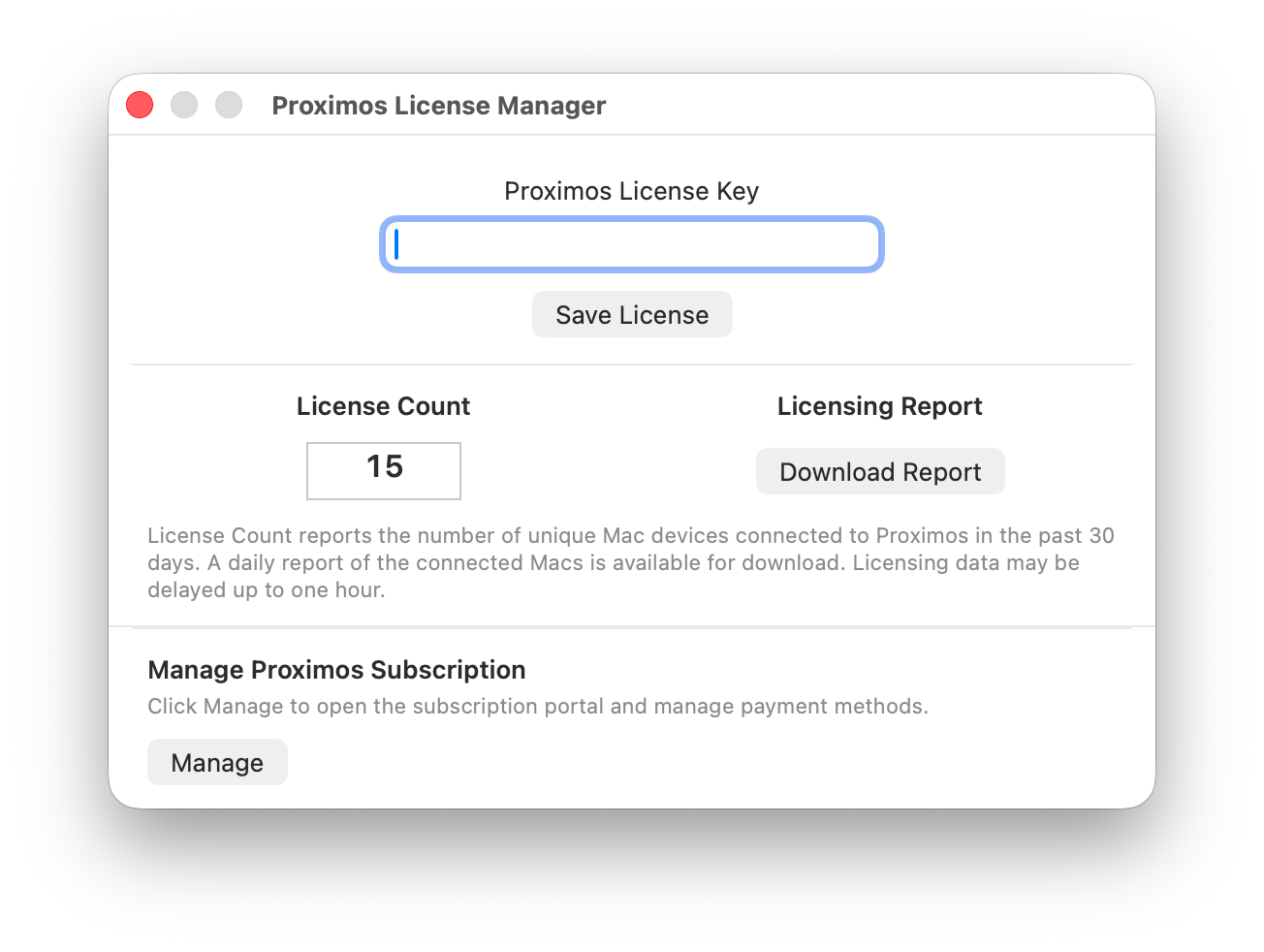
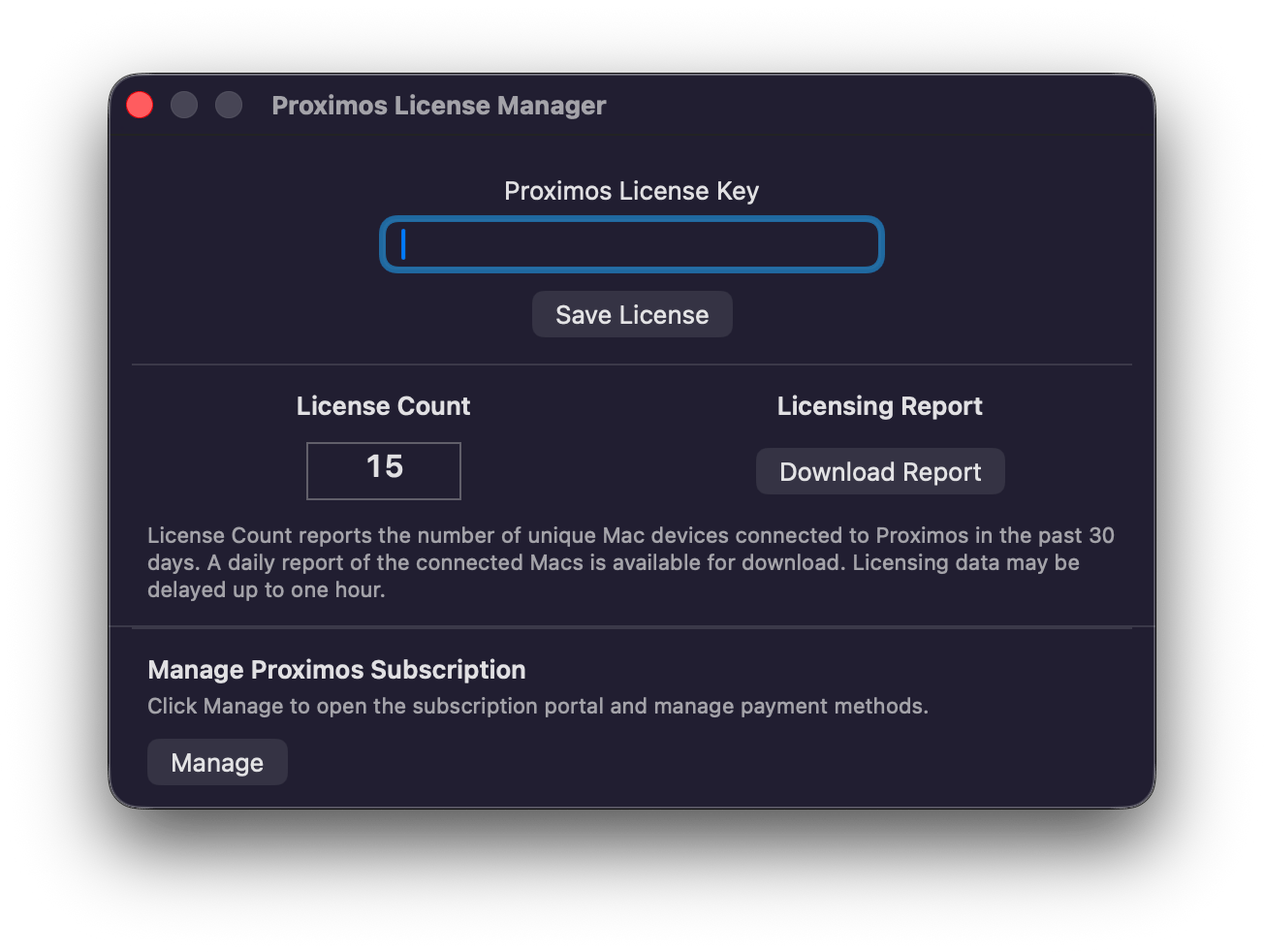
The **Proximos License Manager** window (accessible from the menu bar in Standard mode — see [Entering Your License Key](/proximos/getting-started#entering-your-license-key)) is where you manage everything related to your subscription: entering or updating your license key, purchasing or upgrading a plan, and reviewing how many Macs are currently connected under your license.
 ### Viewing Your License Count
When a valid license key is present, the License Manager displays a **License Count** — the number of unique Mac devices that have connected to Proximos under your license key in the past 30 days, fetched live from the Proximos Engine. A spinning indicator shows while the count is loading. Licensing data may be delayed by up to one hour, so a Mac that connected very recently may not be reflected immediately.
### Downloading a Usage Report
A **Download Report** button retrieves a daily CSV report listing all Macs connected to Proximos under your license key over the past 30 days, downloaded directly from a signed AWS S3 URL. A standard macOS Save dialog lets you choose where to save the file — useful for license audits, true-up reviews ahead of a tier change, or simply keeping records of your deployed fleet.
### Requesting a Report Without Opening Proximos
The same connected-device information is also available without opening the License Manager. You can request a license report through the Requests Zone on the [Enlazo Help page](https://www.enlazosystems.com/help), and it will be emailed to the address on your account — useful for billing or procurement teams who need fleet counts but don't have access to an admin Mac running Proximos.
### Managing Your Subscription
A **Manage** button opens the Stripe customer portal in an embedded WebView, where you can update your payment method, view invoices, and review your current plan. See [Licensing Overview](/proximos/licensing-overview) for the full tier structure, automated upgrade logic, and downgrade process.
***
## Automated Tier Upgrade Logic
***What is a Mac UUID?***
Mac UUID's are a string of 32 characters that identify an individual Mac. Mac UUID's are **random** and **non-identifiable** to any individual person, Mac model, or Mac serial number. A UUID simply represents a **Mac that exists**. A Mac will generate a new random UUID if the macOS is reinstalled. It is common practice to license software by Mac UUID.
Example Mac UUID: `12345678-1234-1234-1234-1234567890ab`
The Proximos Engine tracks the number of unique Mac UUIDs that check in against each license key over a rolling 30-day window. If your active Mac UUID count exceeds **110% of your current tier's device limit and sustains that level for 30 consecutive days**, your subscription is automatically upgraded to the tier that matches your actual active device count at the next billing cycle.
**Example:** If you are on the 100-Mac Business Plus Pack ($74.99/mo) and your fleet grows to 112 Macs — which is more than 10% above the 100-device limit — and stays at or above that number for 30 days, your subscription automatically upgrades to the 250-Mac Business Premium Pack ($189.99/mo).
This ensures your license always covers your actual device count as your organization grows, without requiring manual tier management. You will be notified at the email address on your Stripe subscription before any tier change takes effect.
**Trial Period Note:** Automated tier upgrades do not trigger during an active trial period. When your trial converts to a paid subscription, it is set at the tier matching your actual device count at that time, not the trial tier.
***
## Subscription Downgrades
Subscription downgrades can be requested by contacting Enlazo Systems at [**support@enlazosystems.com**](mailto:support@enlazosystems.com). Downgrades are not automated and require a manual review to confirm the lower tier device count is appropriate for your current fleet size.
Include in your request:
* Your current subscription details
* The desired new tier and device count
* Confirmation that your active Mac count is within the lower tier's limit
Downgrades take effect at the next billing cycle following approval.
As a self-service alternative, you can cancel your subscription using the **Manage** button in the License Manager, then sign up for a new subscription at your desired tier. Your previous license key will be reactivated and re-approved automatically. For a re-subscription, the trial period is skipped and payment processing begins immediately.
## Caution: Re-imaging / Reformatting Macs & Licensing
A Mac’s UUID changes if the macOS is reinstalled. Because the Proximos Engine maintains a rolling 30-day count of Mac UUIDs, a reformatted Mac will be counted as two devices for 30 days.
If your IT team performs a large-scale re-image or redeployment, this may temporarily inflate your license count. If that increase triggers an automatic tier upgrade, it would be reasonable to honor a requested downgrade in this situation.
A Mac’s UUID changes when macOS is reinstalled. Because the Proximos Engine maintains a rolling 30-day count of Mac UUIDs, a reformatted Mac may be counted as two devices for up to 30 days.
If your IT team performs a large-scale reimage or redeployment, this may temporarily inflate your license count. If that increase triggers an automatic tier upgrade, it would be reasonable to honor a requested downgrade in this situation.
### Viewing Your License Count
When a valid license key is present, the License Manager displays a **License Count** — the number of unique Mac devices that have connected to Proximos under your license key in the past 30 days, fetched live from the Proximos Engine. A spinning indicator shows while the count is loading. Licensing data may be delayed by up to one hour, so a Mac that connected very recently may not be reflected immediately.
### Downloading a Usage Report
A **Download Report** button retrieves a daily CSV report listing all Macs connected to Proximos under your license key over the past 30 days, downloaded directly from a signed AWS S3 URL. A standard macOS Save dialog lets you choose where to save the file — useful for license audits, true-up reviews ahead of a tier change, or simply keeping records of your deployed fleet.
### Requesting a Report Without Opening Proximos
The same connected-device information is also available without opening the License Manager. You can request a license report through the Requests Zone on the [Enlazo Help page](https://www.enlazosystems.com/help), and it will be emailed to the address on your account — useful for billing or procurement teams who need fleet counts but don't have access to an admin Mac running Proximos.
### Managing Your Subscription
A **Manage** button opens the Stripe customer portal in an embedded WebView, where you can update your payment method, view invoices, and review your current plan. See [Licensing Overview](/proximos/licensing-overview) for the full tier structure, automated upgrade logic, and downgrade process.
***
## Automated Tier Upgrade Logic
***What is a Mac UUID?***
Mac UUID's are a string of 32 characters that identify an individual Mac. Mac UUID's are **random** and **non-identifiable** to any individual person, Mac model, or Mac serial number. A UUID simply represents a **Mac that exists**. A Mac will generate a new random UUID if the macOS is reinstalled. It is common practice to license software by Mac UUID.
Example Mac UUID: `12345678-1234-1234-1234-1234567890ab`
The Proximos Engine tracks the number of unique Mac UUIDs that check in against each license key over a rolling 30-day window. If your active Mac UUID count exceeds **110% of your current tier's device limit and sustains that level for 30 consecutive days**, your subscription is automatically upgraded to the tier that matches your actual active device count at the next billing cycle.
**Example:** If you are on the 100-Mac Business Plus Pack ($74.99/mo) and your fleet grows to 112 Macs — which is more than 10% above the 100-device limit — and stays at or above that number for 30 days, your subscription automatically upgrades to the 250-Mac Business Premium Pack ($189.99/mo).
This ensures your license always covers your actual device count as your organization grows, without requiring manual tier management. You will be notified at the email address on your Stripe subscription before any tier change takes effect.
**Trial Period Note:** Automated tier upgrades do not trigger during an active trial period. When your trial converts to a paid subscription, it is set at the tier matching your actual device count at that time, not the trial tier.
***
## Subscription Downgrades
Subscription downgrades can be requested by contacting Enlazo Systems at [**support@enlazosystems.com**](mailto:support@enlazosystems.com). Downgrades are not automated and require a manual review to confirm the lower tier device count is appropriate for your current fleet size.
Include in your request:
* Your current subscription details
* The desired new tier and device count
* Confirmation that your active Mac count is within the lower tier's limit
Downgrades take effect at the next billing cycle following approval.
As a self-service alternative, you can cancel your subscription using the **Manage** button in the License Manager, then sign up for a new subscription at your desired tier. Your previous license key will be reactivated and re-approved automatically. For a re-subscription, the trial period is skipped and payment processing begins immediately.
## Caution: Re-imaging / Reformatting Macs & Licensing
A Mac’s UUID changes if the macOS is reinstalled. Because the Proximos Engine maintains a rolling 30-day count of Mac UUIDs, a reformatted Mac will be counted as two devices for 30 days.
If your IT team performs a large-scale re-image or redeployment, this may temporarily inflate your license count. If that increase triggers an automatic tier upgrade, it would be reasonable to honor a requested downgrade in this situation.
A Mac’s UUID changes when macOS is reinstalled. Because the Proximos Engine maintains a rolling 30-day count of Mac UUIDs, a reformatted Mac may be counted as two devices for up to 30 days.
If your IT team performs a large-scale reimage or redeployment, this may temporarily inflate your license count. If that increase triggers an automatic tier upgrade, it would be reasonable to honor a requested downgrade in this situation.