
60-Day Free Trial
Every new Proximos license includes a 60-day free trial. No upfront commitment required — just purchase and your trial begins immediately. Since the product can only be tested with available macOS updates, A 60-day trial is to allow enough time for Apple to provide at least one or two macOS Update cycles. Automated tier upgrades do not trigger during an active trial period. When your trial converts to a paid subscription, it is set at the tier matching your actual device count at that time. Only one free trial period is allowed per e-mail address. Cancellation of a trial at any time will forfeit the one provided trial. Subsequent trial signups will be auto converted to active payment. At this time, we do not require a credit card on file to authorize the trial for the Starter and Office packs. A credit card is required for trial signup with the Business, Corporate, and Enterprise packages.Purchase a License
Get started at enlazosystems.com. Payments are processed securely by Stripe.
Product Tiers
Proximos is licensed per device on a monthly subscription basis. Each plan includes a license key valid for a specific number of Macs. All tiers include the full Proximos feature set.
All plans are monthly subscriptions billed via Stripe. Purchase directly from the tier dropdown inside the Proximos License Manager window, or at enlazosystems.com.
Direct purchase links:
- 5 Macs – $4.99/mo
- 10 Macs – $9.99/mo
- 25 Macs – $19.99/mo
- 50 Macs – $34.99/mo
- 100 Macs – $74.99/mo
- 250 Macs – $189.99/mo
- 500 Macs – $324.99/mo
- 750 Macs – $489.99/mo
- 1,000 Macs – $599.99/mo
- 1,500 Macs – $824.99/mo
- 2,000 Macs – $999.99/mo
- 3,000 Macs – $1,649.99/mo
- 4,000 Macs – $2,199.99/mo
- 5,000 Macs – $2,499.99/mo
- 7,500 Macs – $3,749.99/mo
- 10,000 Macs – $4,999.99/mo
Educational Discounts
Educational institutions receive 30% off any Proximos subscription tier.Standard
Full priceAll subscription tiers at standard pricing. Payments processed via Stripe.
Education
30% offSame tiers, discounted for qualifying educational institutions. Payments processed via Stripe.
.edu email address, an educational discount code will be emailed to you for use at checkout. Regardless, if you purchase Proximos with a .edu e-mail address, our Licensing Engine will automatically apply the educational discount within 24 hours.
Request an Educational Discount
Submit your .edu email in the Requests Zone at enlazosystems.com/help to receive your discount code.
.edu address, the discount will be removed.
License Manager
The Proximos License Manager window (accessible from the menu bar in Standard mode — see Entering Your License Key) is where you manage everything related to your subscription: entering or updating your license key, purchasing or upgrading a plan, and reviewing how many Macs are currently connected under your license.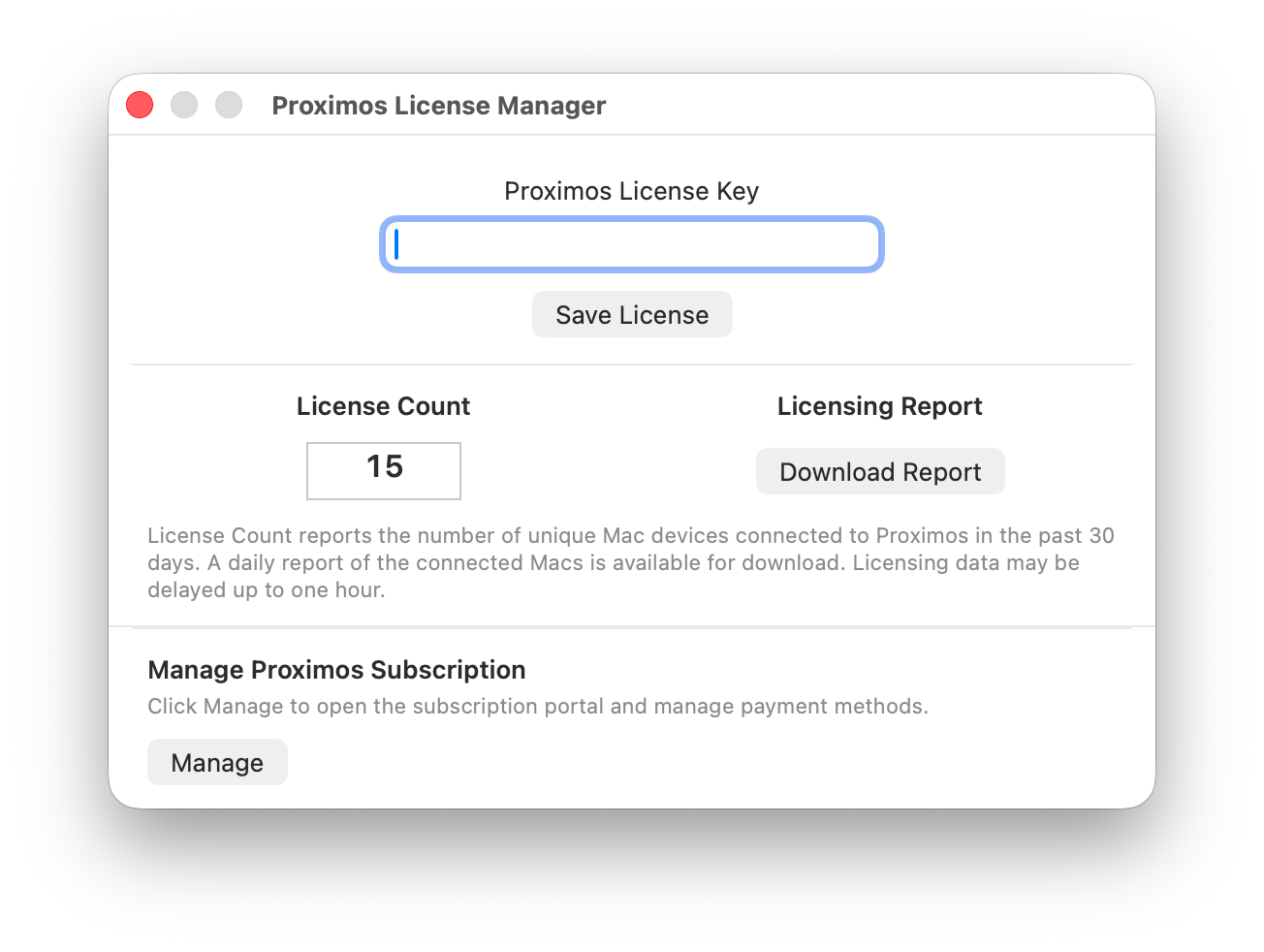
Viewing Your License Count
When a valid license key is present, the License Manager displays a License Count — the number of unique Mac devices that have connected to Proximos under your license key in the past 30 days, fetched live from the Proximos Engine. A spinning indicator shows while the count is loading. Licensing data may be delayed by up to one hour, so a Mac that connected very recently may not be reflected immediately.Downloading a Usage Report
A Download Report button retrieves a daily CSV report listing all Macs connected to Proximos under your license key over the past 30 days, downloaded directly from a signed AWS S3 URL. A standard macOS Save dialog lets you choose where to save the file — useful for license audits, true-up reviews ahead of a tier change, or simply keeping records of your deployed fleet.Requesting a Report Without Opening Proximos
The same connected-device information is also available without opening the License Manager. You can request a license report through the Requests Zone on the Enlazo Help page, and it will be emailed to the address on your account — useful for billing or procurement teams who need fleet counts but don’t have access to an admin Mac running Proximos.Managing Your Subscription
A Manage button opens the Stripe customer portal in an embedded WebView, where you can update your payment method, view invoices, and review your current plan. See Licensing Overview for the full tier structure, automated upgrade logic, and downgrade process.Automated Tier Upgrade Logic
What is a Mac UUID? Mac UUID’s are a string of 32 characters that identify an individual Mac. Mac UUID’s are random and non-identifiable to any individual person, Mac model, or Mac serial number. A UUID simply represents a Mac that exists. A Mac will generate a new random UUID if the macOS is reinstalled. It is common practice to license software by Mac UUID. Example Mac UUID:12345678-1234-1234-1234-1234567890ab
The Proximos Engine tracks the number of unique Mac UUIDs that check in against each license key over a rolling 30-day window. If your active Mac UUID count exceeds 110% of your current tier’s device limit and sustains that level for 30 consecutive days, your subscription is automatically upgraded to the tier that matches your actual active device count at the next billing cycle.
Example: If you are on the 100-Mac Business Plus Pack (189.99/mo).
This ensures your license always covers your actual device count as your organization grows, without requiring manual tier management. You will be notified at the email address on your Stripe subscription before any tier change takes effect.
Trial Period Note: Automated tier upgrades do not trigger during an active trial period. When your trial converts to a paid subscription, it is set at the tier matching your actual device count at that time, not the trial tier.
Subscription Downgrades
Subscription downgrades can be requested by contacting Enlazo Systems at support@enlazosystems.com. Downgrades are not automated and require a manual review to confirm the lower tier device count is appropriate for your current fleet size. Include in your request:- Your current subscription details
- The desired new tier and device count
- Confirmation that your active Mac count is within the lower tier’s limit